These are the five best static application security testing (SAST) solutions for 2026, but explore our detailed guide for a breakdown of the 13 top SAST tools for enterprises.
| Top SAST Tools Highlights | Best for | AI Capabilities | Key Features |
|---|---|---|---|
 Cycode Cycode |
Enterprises that want SAST accuracy plus code-to-cloud context in one platform | AI SAST combining deterministic scanning with LLM reasoning, AI-generated rules, agentic remediation, and AI exploitability analysis | AI-powered scanning, 31% faster scans, 94% reduction in false positives, Risk Intelligence Graph. Additional AI capabilities include: Exploitability Agent, Fix and Remediation Agent, and Shadow AI Detection |
 Checkmarx Checkmarx |
Large security teams consolidating every AppSec category with one vendor | AI query builder and AI-assisted remediation guidance | Enterprise-grade SAST, 35+ languages |
 Veracode Veracode |
Regulated enterprises needing compliance evidence and binary scanning | Veracode Fix for AI-generated remediation suggestions | Binary analysis, cloud-based platform, 100+ languages, expert remediation guidance |
 Snyk Code Snyk Code |
Developer-led teams wanting fast feedback in the IDE and pull request | DeepCode AI for real-time scanning and autofix suggestions | Developer-first approach, real-time scanning, 80%-accurate AI fixes, fast incremental scans |
 Mend.io Mend.io |
Teams prioritizing dependency risk with SAST as a secondary need | AI-native platform with automated remediation and scorecard-based risk views | AI-native platform, automated remediation, holistic AppSec approach |
Explore Cycode’s SAST Scanning Solution
What Are Static Application Security Testing Tools?
Static Application Security Testing tools scan application source code, bytecode, or binaries (also known as executables) to detect security vulnerabilities in the application without executing the software. These are automated code inspection tools that are used during the development phase, which allow organizations to find and address security vulnerabilities before the applications hit production environments.
SAST tools are fundamental to the code security strategy of any modern enterprise, enabling “shift-left” security by embedding vulnerability detection in the development workflow itself. These solutions can find a broad spectrum of vulnerabilities such as injection flaws, authentication bypasses, cryptographic weaknesses, and configuration errors through review of code structure, data flow patterns, and implementation logic.
The consequences of insufficient SAST testing can be severe for enterprise organizations:
- Higher remediation costs if security issues are found later in the software development lifecycle, or even worse, after deployment
- Breaches and fines for not achieving security compliance in their regulated sectors
- Loss of customer trust and damage to reputation due to preventable security events
- Postponed product launches when a lack of security in the product is discovered in the final security reviews
Best SAST Tools: Comparing the Top 13 Options in 2026
The tools below include developer-first scanners that live in the IDE alongside enterprise platforms built around policy and compliance reporting. What separates the best rated static application security testing tools from the rest is usually false positive rate and how cleanly a tool fits into existing developer workflows. Use the comparison to shortlist two or three worth trialling against your own codebase, since scanner accuracy varies considerably by stack.
1. Cycode
Cycode is an Agentic Development Security platform that fundamentally transforms enterprise Static Application Security Testing capabilities through artificial intelligence. The company’s AI-powered SAST engine combines real-time scanning with unique multi-file and multi-function-level analysis, enabling the highest level of accuracy the industry has ever seen at high velocity.
Cycode distinguishes itself with its Risk Intelligence Graph (RIG), an AI-powered code-to-cloud traceability solution that spans the entire software development lifecycle. This approach goes beyond identifying vulnerabilities to explaining why they matter, that is, which of them are actually going to be the greatest risks to the business based on exploitability and paths of exposure.
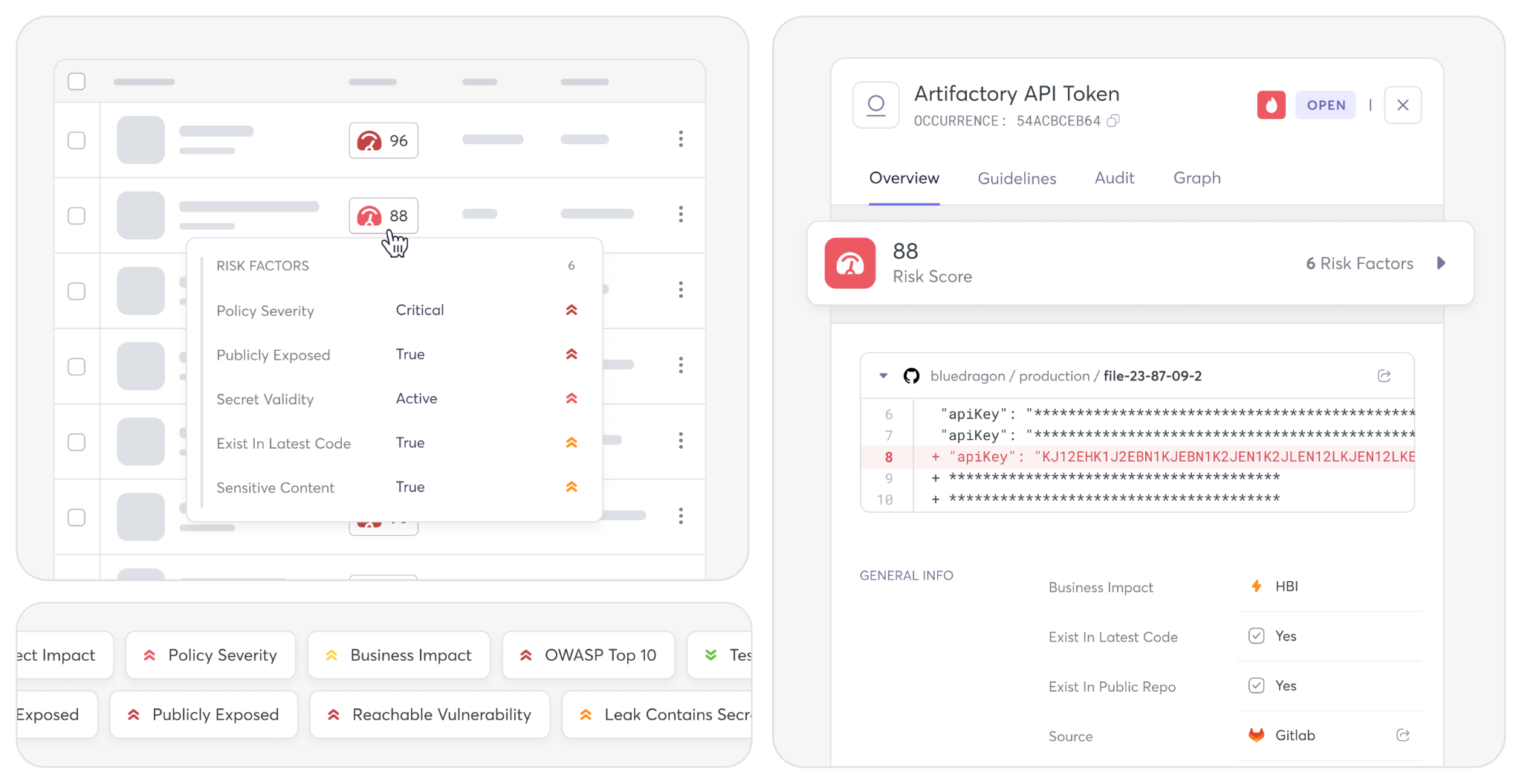
Compared to traditional SAST tools, the platform reduces false positives by an astonishing 94% while keeping recalls on the true positives high.
Pros
- Including Agentic Code Scanning
- Change Impact Analysis flags high-risk code changes as they merge
- Source Code Leakage Detection monitors public repos for exposed code
- 31% faster scanning with real-time vulnerability detection
- Advanced data flow visualization for context-rich remediation
- Sensitive data leak prevention with exposure path analysis
Cons
- Full platform, so teams wanting only a scanner will underuse it
- Strongest results come after onboarding, not on day one
Key AI Capabilities
Exploitability Agent, Fix and Remediation Agent, Shadow AI Detection, and more.
2. Checkmarx
Checkmarx One offers a holistic approach to appsec from code to cloud with comprehensive SAST capabilities combined with AI-driven solutions for people, processes, and products. The strength of the platform is the enterprise-grade functionality, supporting 35+ programming languages.
Pros
- Enterprise-proven scalability and reliability
- Comprehensive language and framework support
- Advanced AI-powered security features
Cons
- Complex setup and configuration requirements
- Higher total cost of ownership
- Steep learning curve for new users
Key Checkmarx Features
- Agentic AI cybersecurity agents with real-time threat detection
- AI Security Champion with automated code remediation
- Enterprise-grade policy management and compliance dashboards
3. Veracode
Veracode is a cloud-based application security platform, but with a twist; the unique binary analysis allows security testing without access to source code. This feature makes Veracode a strong asset for enterprises using third-party components or any legacy systems in which source code is not easily available.
Pros
- Unique binary analysis without source code requirements
- Extensive language and platform support
- Cloud-based scalability and reliability
Cons
- Higher pricing compared to some alternatives
- Complex initial setup and configuration
- Slower scan times for large applications
Key Veracode Features
- Binary code analysis capabilities for source-code-free scanning
- Support for 100+ programming languages and frameworks
- Cloud-based architecture with automatic scaling
4. Snyk Code
Snyk Code is a static application security testing solution developed with a developer-first approach, meant to seamlessly integrate into modern development workflows with zero interruptions to developer productivity. Snyk code is powered by a machine learning and AI platform, offering real-time threat detection with a near-zero false positive and true positive ratio.
Pros
- Exceptional speed and developer experience
- High accuracy with minimal false positives
- Strong integration with development tools
Cons
- Limited enterprise-grade reporting features
- Pricing can escalate with team size
- Less comprehensive than some enterprise solutions
Key Snyk Features
- Real-time scanning with up to 50x faster performance
- AI-powered remediation with 80%-accurate automated fixes
- Seamless IDE and CI/CD pipeline integrations
5. Mend.io
Mend.io (formerly known as WhiteSource) has developed into a next-gen AI-native AppSec platform integrating SAST with full software composition analysis and container security capabilities. Using a scorecard-like methodology, the platform offers automated remediation and a comprehensive view of application security.
Pros
- Comprehensive all-in-one security platform
- Fast scanning with automated remediation
- Strong integration capabilities
Cons
- A complex feature set may overwhelm smaller teams
- Pricing structure can be unclear
- Relatively newer SAST capabilities
Key Mend.io Features
- AI-native platform with faster scanning capabilities
- Unified application security, including SAST, SCA, and container security
- Automated remediation with AI-powered code fixes
6. SonarQube / SonarCloud
SonarQube is one of the most mature and widely used code quality and security platforms, used by millions of developers for its broad analysis capabilities across a variety of programming languages. In addition to static application security testing, the platform can also perform code quality checks, and it has built-in support for more than 30 programming languages and 6,500 rules.
Pros
- Mature platform with extensive language support
- Strong open-source community and ecosystem
- Comprehensive code quality and security analysis
Cons
- Enterprise features require commercial licensing
- Can be resource-intensive for large codebases
- Complex configuration for advanced features
Key SonarQube Features
- Support for 30+ languages with 6,500+ built-in security rules
- Advanced SAST with cross-file third-party dependency analysis
- AI CodeFix for automated vulnerability remediation
7. GitHub CodeQL
GitHub CodeQL offers static application security testing (SAST) with a high-level query-based model, capable of deep semantic analysis that can detect complex security vulnerabilities in many programming languages. CodeQL was developed by Semmle and subsequently bought by GitHub, where it has become a natural part of the GitHub ecosystem, with native GitHub integration via GitHub repositories and GitHub workflows.
Pros
- Deep semantic analysis with high accuracy
- Native integration with GitHub workflows
- Strong community support and query sharing
Cons
- Limited to the GitHub ecosystem for full features
- Steep learning curve for query language
- Slower scan times compared to pattern-based tools
Key GitHub CodeQL Features
- Advanced semantic analysis with query-based vulnerability detection
- Native GitHub integration with automated security alerts
- Copilot-powered autofix for select security vulnerabilities
8. GitLab SAST
GitLab SAST offers fully integrated static application security testing solutions at the DevSecOps platform level, as part of GitLab’s unified software development, application security, and DevSecOps testing platform. With integrated SAST scanning, the platform scans code during CI/CD for security vulnerabilities and displays the results directly in merge requests and security dashboards.
Pros
- Seamless integration with the GitLab ecosystem
- Easy deployment with minimal configuration
- Unified DevSecOps platform experience
Cons
- Limited effectiveness outside the GitLab environment
- Less customization compared to dedicated SAST tools
- Dependent on GitLab’s scanning engine updates
Key GitLab SAST Features
- Built-in CI/CD integration with automated security scanning
- Multi-engine approach for comprehensive vulnerability coverage
- Native merge request integration with inline security findings
9. Semgrep
Semgrep provides a distinctive flavor of static application security testing using a pattern-matching analysis engine, allowing developers and security teams to write their own custom rules using a syntax that is close to the target programming language. Semgrep’s strength is in this approach because it empowers organizations to adopt site and project-specific coding standards or find unique vulnerability patterns that standard SAST tools will not find.
Pros
- Highly customizable with easy rule creation
- Fast scanning with excellent performance
- Strong developer community and rule sharing
Cons
- Requires security expertise for effective rule writing
- Limited out-of-the-box enterprise reporting
- Less comprehensive than traditional enterprise SAST
Key Semgrep Features
- Pattern-based analysis with custom rule creation capabilities
- Support for 30+ programming languages with unified rule syntax
- AI Assistant for intelligent finding triage and remediation guidance
10. Fortify Static Code Analyzer
Fortify Static Code Analyzer, part of the Micro Focus portfolio, is one of the original and most robust enterprise SAST solutions on the market. The platform is built to scale up for enterprise usage, ready to support more languages per tenant, offer enhanced vulnerability detection capabilities per language, and a compliance report generator that helps enterprise-grade security organizations exceed highly regulated industry expectations per tenant.
Pros
- Mature platform with extensive enterprise features
- Comprehensive language and framework support
- Strong compliance and audit capabilities
Cons
- Complex setup and configuration requirements
- Higher total cost of ownership
- Slower scan times compared to modern alternatives
Key Fortify Static Code Analyzer Features
- Comprehensive language support, including legacy and specialized languages
- Enterprise-grade policy management and compliance reporting
- Advanced vulnerability prioritization and risk assessment
11. HCL AppScan
HCL AppScan delivers an all-in-one application security platform with static application security testing, dynamic testing, interactive testing, and software composition analysis capabilities. The platform is built for large organizations that need deep security test coverage over varied application portfolios and development environments.
Pros
- Comprehensive application security testing suite
- Strong enterprise features and scalability
- Extensive compliance and reporting capabilities
Cons
- Complex platform requiring significant training
- Higher cost compared to focused SAST solutions
- Slower adoption of modern development practices
Key HCL AppScan Features
- Comprehensive static analysis with extensive language support
- Integrated application security testing platform approach
- Enterprise-grade vulnerability management and reporting
12. Qwiet AI
Qwiet AI (formerly ShiftLeft) is the next-gen static application security testing that uses artificial intelligence and machine learning for intelligent vulnerability prioritization and context-sensitive security analysis. The platform is designed to minimize noise and false alarms and provide developers with actionable insights to understand the underlying security issue and remediate it quickly.
Pros
- Intelligent AI-powered analysis reduces noise
- Strong focus on developer experience
- Rapid deployment and easy integration
Cons
- Newer platform with a limited enterprise track record
- May lack some advanced enterprise features
- Limited customization compared to established tools
Key Qwiet AI Features
- AI-powered vulnerability prioritization and context analysis
- Intelligent false positive reduction with business context awareness
- Developer-friendly interface with actionable remediation guidance
13. CodeAnt AI
CodeAnt AI is one of the new entrants with their AI-based SAST that aims to employ artificial intelligence to improve both the accuracy of vulnerability detection and developer productivity. The platform highlights integration with modern workflows for development and intelligent issue detection to help dev teams prioritize security risk remediation.
Pros
- Modern AI-powered approach to static analysis
- Developer-friendly design and user experience
- Cloud-native architecture with good scalability
Cons
- Limited track record in enterprise environments
- May lack comprehensive enterprise features
- Smaller ecosystem and community support
Key CodeAnt AI Features
- AI-powered static analysis with intelligent issue detection
- Modern development workflow integration and automation
- Developer-friendly interface designed for rapid adoption
How Do SAST Security Tools Work?
A SAST tool never runs the application, so everything it knows has to come from reading the code as text and building a model it can reason about. That model is what turns a file of characters into something a scanner can trace paths through and ask questions of. The four stages below describe how a finding gets from raw source to a report somebody acts on.
- Code Parsing and Modeling: The scanner reads each file and converts it into an abstract syntax tree, then links those trees into a graph covering the whole project. This stage is why SAST needs to understand your language and framework rather than just pattern-match on strings.
- Rule-Based and Semantic Analysis: Rules run against that model to flag known-bad constructs, such as a deprecated cryptographic function or a banned API call. Semantic analysis goes further by resolving what a variable actually holds, which separates a real risk from an identically named safe one.
- Control and Data Flow Analysis: The scanner traces how untrusted input travels from where it enters to where it gets used, following the path across functions and files. A route that reaches a database query or a rendered page without validation along the way is what produces an injection finding.
- Vulnerability Prioritization and Reporting: The tool scores each finding, merges duplicates, and routes the result to whoever owns the affected code. Ranking by exploitability and exposure rather than severity alone is what decides whether the report gets worked through or ignored.
What Are the Benefits of SAST Testing Tools for Enterprises?
SAST gives enterprises a way to catch security flaws while the code is still cheap to change, and the returns show up in engineering time as much as in risk reduction. The five benefits below are the ones large organizations tend to notice first, starting with the cost of a fix and ending with what an auditor asks for.
Early Vulnerability Detection
SAST testing allows organizations to test their code for security vulnerabilities at the earliest stages of the development lifecycle – often during the coding phase, prior to applications being compiled or deployed. Early detection is essential for enterprises as it enables security issues to be addressed at the lowest cost and with the least disruption to remediate. Key benefits include:
- Lowered risk remediation costs by catching vulnerabilities before they reach production
- Quick resolution time when developers can recall the code they have written
- Avoidance of security debt that may hamper future development attempts
Cost Efficiency
SAST testing, when performed in the beginning stages of development, also saves costs significantly since remediating an exploited vulnerability later in the application lifecycle is much more costly. According to IBM, the average cost of a US data breach hit $10.22 million in 2025, a 9% increase year-over-year.
Enterprise users benefit from:
- Reduce the total cost of ownership through decreased security incidents
- Decrease in emergency patching that interrupts planned development schedules
Explore how Cycode AI Exploitability Agent helps prioritize high-risk fixes 99% faster.
Improved Code Quality
Not only does the SAST tool help in finding security vulnerabilities, but it can also flag bad coding practices, which leads to software maintenance issues or technical debt and thus contributes to code quality as a whole. This dual benefit helps enterprises:
- Formalize secure coding practices that enhance the long-term maintainability of the application
- Address technical debt and problematic code patterns early
- Educate developers on secure coding practices
Developer Workflow Integration
Modern SAST tools seamlessly integrate into existing developer workflows to deliver security feedback while functioning as expected and not hindering productivity. This integration enables:
- Instilling real-time security feedback directly in IDEs and code editors
- Part of the CI/CD pipeline processes involves automated security checks
- Pull request integration that ensures vulnerable code is NOT committed/merged
Regulatory Compliance Support
SAST helps enterprises comply with various regulations and industrial compliance needs by providing documented evidence of security testing and vulnerability management procedures. This support includes:
How to Select the Right SAST Solution?
Most SAST evaluations stall because every vendor’s feature list looks roughly the same on paper. The five areas below are where tools actually diverge once you run them against your own codebase, which is the only test that settles the question. Working through them in order tends to narrow a long shortlist faster than another round of vendor demos.
1. Evaluate Core Functionality
Choosing the right SAST tool always begins with matching the core features of the product to your specific requirements for secure application testing. When choosing a tool, begin your assessment with support for languages and frameworks to ensure that the tool can analyze all technologies utilized in your development environment.
Evaluate how deep its security analysis goes, including whether it can do cross-file analysis, data flow tracking, and detection of complex vulnerability patterns. If the tool identifies only a few true positives and its management of false positives is not adequate, then development teams become inundated with alerts, and the tool is more a hindrance than a help.
Key evaluation criteria include:
- Supports all languages in your DevSecOps tech stack
- Advanced analysis, such as taint analysis and cross-function-based vulnerability detection
- Accuracy metrics with demonstrated low false positive rates and high true positive detection
2. Check Developer Experience
When it comes to SAST tools, almost all success hinges on adoption by developers, which requires evaluating how well tools fit into existing development workflows and whether or not they help or hinder developer productivity. Evaluate the integration capabilities of the tool and how well it connects with commonly used IDEs, version control systems, and CI/CD platforms your teams are already using.
Explore the quality and usefulness of the remediation guidance that the tool provides (e.g., does it recommend actionable fixes, is it accompanied by educational content to help developers understand and solve security concerns, etc.). Identify the performance characteristics of the tool, especially the scan speed and other resource aspects, since slower and resource-consuming tools usually become a bottleneck in the development workflow.
Developer experience considerations include:
- Inline security analysis with real-time feedback for IDE integration quality
- CI/CD pipeline compatible with automated security scanning without interrupting the workflow
- Remediation guidance quality with actionable fix recommendations and secure coding education
3. Assess Integration and Scalability
Enterprise organizations require SAST tools that can scale effectively across large development teams and integrate seamlessly with existing security and development infrastructure. Evaluate the tool’s ability to handle large codebases and multiple simultaneous scans without performance degradation.
Consider integration capabilities with existing security tools, vulnerability management systems, and reporting platforms to ensure the enterprise SAST tool fits within your broader security ecosystem. Assess the tool’s deployment options, including cloud-based, on-premises, and hybrid configurations, to ensure they align with your organization’s infrastructure and data security requirements.
Scalability and integration factors include:
- Scalability of performance for large codebases and high-volume scanning needs
- Integration of the security tool with existing vulnerability management and reporting systems
- Flexibility in deployment to meet cloud, on-premises, and hybrid infrastructure requirements
4. Consider Customizability and Compliance
A SAST tool might need some customizations, as different organizations have different security needs, coding standards, and compliance requirements. Assess whether it can help you with your specific security-related matters or coding standards by allowing you to create your own rules and policies.
Evaluate a tool’s capability for monitoring compliance, making sure it can produce reports for applicable regulatory regimes and industry benchmarks. Evaluate whether the tool allows you to modify your scanning configurations, severity thresholds, and workflow integrations to align with your security processes.
Customization and compliance considerations include:
- Ability to create custom rules for security needs specific to an organization
- Enterprise governance and compliance-capable SaaS policy management features
- Compliance reporting against applicable industry standards and regulatory frameworks
5. Review Vendor Support and Value
The value derived from implementing SAST tools is contingent upon the level of vendor support, training materials, and continued platform evolution. Check if they have a track record in the enterprise market with customer references and case studies that have similar implementations.
Evaluate the total cost of ownership, not just based on the initial licensing fee but costs related to implementation, training, and continuing support. Evaluate the vendor’s product roadmap and development priorities to ensure the tool will continue to develop in line with the needs of your organization and with evolving security threats.
Vendor evaluation criteria include:
- Enterprise customer references and a proven track record in similar organizations
- Support quality and availability, including technical support and professional services
- Resources for training and documentation for successful tool adoption and optimization
Need help finding the right tool for your organization? Read our SAST tool buyer’s guide.
Enhance Your Security with Enterprise SAST Solutions from Cycode
The next-generation SAST platform from Cycode embodies the future of enterprise application security with cutting-edge technology and an experience uniquely designed for developers that provides unparalleled security coverage for modern cloud-native development without sacrificing the acceleration in developer velocity.
Our platform takes a unique approach to tackling foundational issues that have historically prevented widespread adoption of traditional SAST tools, while also intimately understanding how to provide enterprise-ready capabilities that grow and scale with your organization’s needs.
With Cycode’s comprehensive SAST solution, your organization gains access to industry-leading features that transform security testing from a development bottleneck into a competitive advantage:
- Agentic Development Lifecycle coverage secures code from AI prompt through cloud deployment.
- Cycode Maestro orchestrates security agents that triage and remediate findings automatically.
- AI Governance inventories every coding assistant in use and enforces policy on each.
- CI/MON runtime memory protection stops mid-build credential theft like the tj-actions attack.
- Converged AST, SSCS, and ASPM replaces three separate point tools with one platform.
- ConnectorX ingests 100+ third-party scanners into a single deduplicated, ranked backlog.
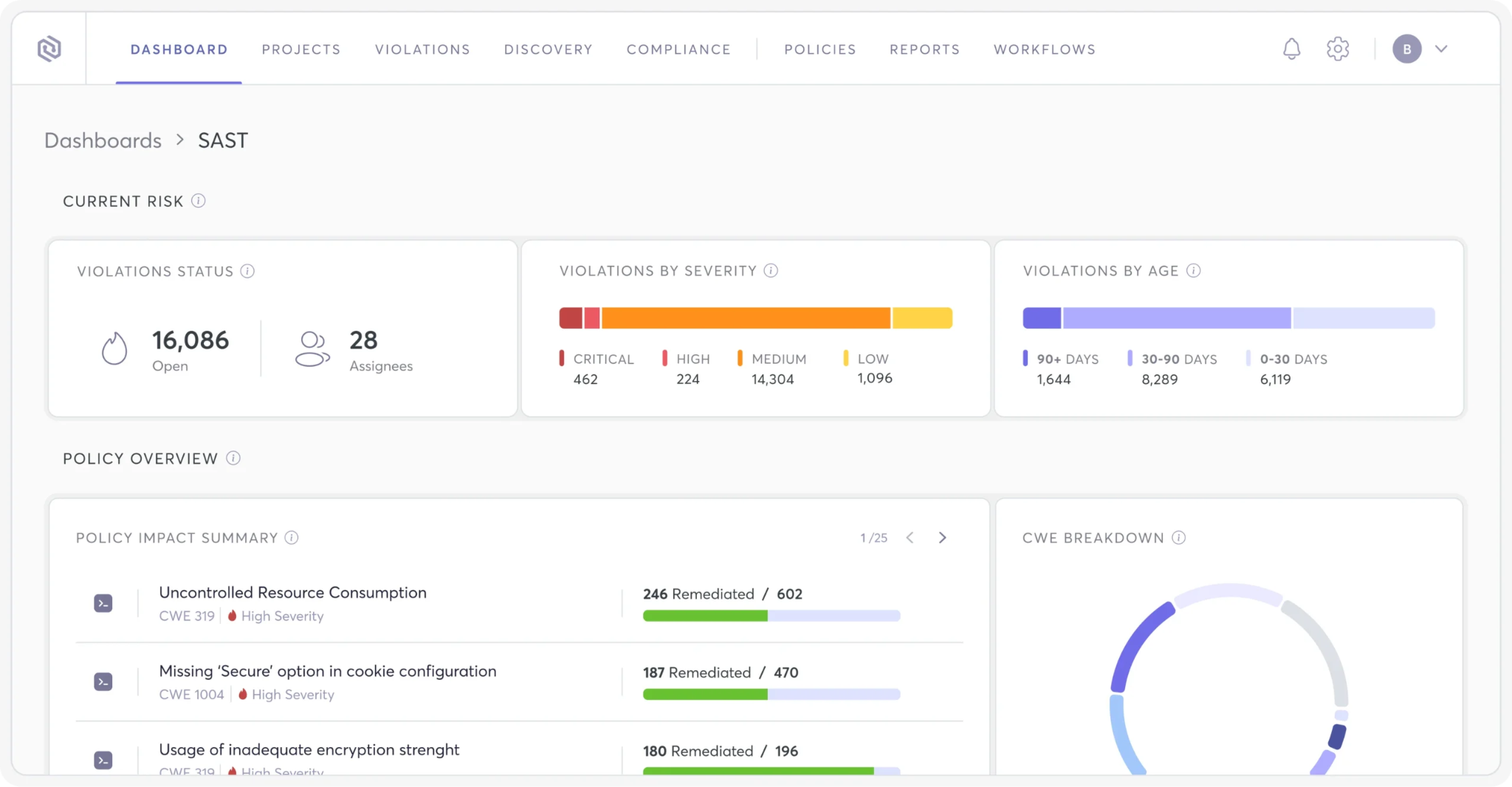
Cycode’s platform represents more than just another SAST tool; it’s a complete application security transformation that enables organizations to build security into their DNA while accelerating innovation and market delivery.
Book a demo today and see why Cycode is one of the top SAST tools for enterprise users.