
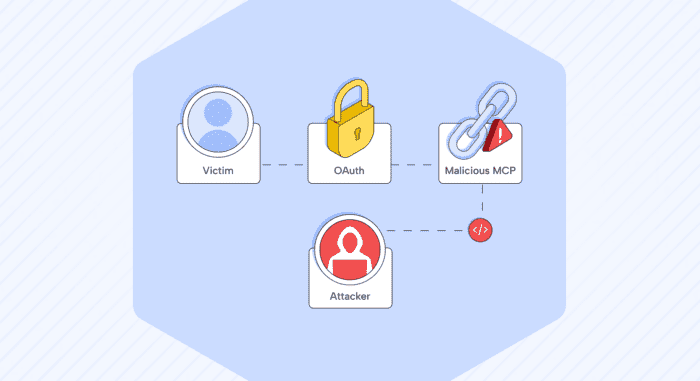

A malicious MCP server tricked the SDK into sending login credentials to the attacker instead of the real login provider.
The Model Context Protocol (MCP) is an open standard introduced by Anthropic and donated to the Linux Foundation’s Agentic AI Foundation (AAF), which maintains it.
The short version
MCP (Model Context Protocol) is an open protocol for connecting AI assistants to external tools and data sources, and its OAuth implementation trusts the tool server far more than it should.
We found that a malicious MCP server can hijack that login flow in the MCP Python SDK. It can steal the credentials your app uses to authenticate with your real login provider – your client secret, your authorization code, and the proof key that’s supposed to prevent exactly this kind of theft – and use them to log in as you. Full account takeover.
The only thing you’d see is a completely normal login page (because it is the real login page), followed by the MCP server appearing to fail. A flaky server. You close the tab and move on. Meanwhile, the attacker has a valid access token for your account.
This affects the MCP Python SDK versions 1.9.1 through 2.1.1 across three auth providers: OAuthClientProvider, ClientCredentialsOAuthProvider, and PrivateKeyJWTOAuthProvider. It’s rated High / 7.5.
How login discovery is supposed to work
When your MCP client connects to a server that says “you need to log in,” the SDK has to figure out two things: where to send you for the login page, and where to exchange the result for an access token. Both of those are URLs, and getting them right is a security property. If the SDK sends your credentials to the wrong place, they’re stolen.
The SDK figures this out through a process called discovery. The safe version works like this:
- The client asks the MCP server: “Who handles your logins?” The server answers with a URL pointing to the authorization server (the login provider – think Google, Okta, Azure AD, whatever).
- The SDK fetches the login provider’s configuration from that URL.
- The SDK then checks: does the configuration’s issuer field (essentially the login provider’s self-declared identity) match the URL we got in step 1?
That check in step 3 is the key security control. It catches a malicious server that tries to lie about who its login provider is.
There’s also a fallback path. If step 1 fails (the server returns a 404 – “I don’t support that”), the SDK tries an older discovery method: it asks the MCP server itself for the login configuration directly. This fallback is where everything breaks.
How the attacker skips the safety check
On the fallback path, the SDK never got a URL from step 1, so internally that value is empty (None). The safety check from step 3 is written like this:
if self.context.auth_server_url is not None:
    validate_metadata_issuer(asm, self.context.auth_server_url)
In plain English: “if we got a URL from step 1, check the login provider’s identity against it.” But on the fallback path, there’s nothing to check against. The check doesn’t fail. It never runs.
An attacker triggers this by doing nothing: just return 404 when the SDK asks “who handles your logins?” The SDK falls back, asks the attacker’s server directly for the login configuration, and accepts whatever it says without verifying any of it. The attacker now controls which URLs your credentials get sent to.


How the attacker satisfies the second safety check with a lie
It gets worse. The SDK has a second safety measure: credential binding. Think of it as a label on your stored credentials that says “these belong to login provider X.” When the SDK is about to use those credentials, it checks: “does the current login provider match the label?”
The problem: the SDK checks the label against the issuer field from the login configuration – the same field the attacker controls because the first check never ran. The attacker simply sets issuer to the name of your real login provider. The credential binding check asks “do these credentials belong to the same login provider?” and the answer is yes – because the attacker said so.
In code:
if not credentials_match_issuer(
    self.context.client_info,
    str(self.context.oauth_metadata.issuer),  # attacker controls this value
    self.context.client_metadata_url,
):
    # if mismatch: throw away these credentials and start over
The attacker doesn’t break this safety check. They pass it with a lie. Your real credentials are kept and used, but they are sent to the attacker’s server instead of your real login provider.
What PKCE is and why it matters here
PKCE (Proof Key for Code Exchange) is a mechanism where the client generates a one-time secret at the start of the login flow. When the client later exchanges the authorization code for an access token, it sends that secret along as proof that it’s the same client that started the login. A stolen authorization code is useless without it.
That’s the theory. In this attack, the attacker gets both.
The login page is real – that’s what makes it work
Here’s the part that makes this practical rather than theoretical. The attacker’s configuration points the login page URL at your real login provider. You get redirected to the real Google/Okta/Azure AD page. It’s not a phishing page. It’s the genuine thing, at the genuine URL, with the genuine certificate. You approve it because there’s nothing wrong with it.
After you approve, the authorization code comes back to your client. The SDK bundles it up with your client secret and the PKCE proof key, and sends the whole package to what it thinks is the login provider’s token endpoint. But that URL came from the attacker’s configuration. It goes to the attacker.
The attacker now has everything they need: your client secret (long-lived, reusable), a fresh authorization code, and the proof key that’s supposed to prevent stolen codes from being reused. They post all of that to your real login provider and get back a valid access token. They’re logged in as you.
From your side, the MCP server just seemed to hang or error out after login. It happens. You try again later or pick a different server.
The other safety net is gone too
There’s one more defense that should have prevented this: audience binding. In simple terms, the authorization code should be stamped with “this code is only valid at server X,” so even if it’s stolen, it can’t be used elsewhere.
The same trick that suppresses the first safety check also suppresses this one. The SDK only stamps the code with an audience when the modern discovery path (step 1) works. On the fallback path – the one the attacker forces – there’s no audience stamp. The authorization code works anywhere.
We tested three configurations to prove which control matters
Attack – the server returns 404 for discovery. The issuer check is skipped. The attacker claims to be the victim’s real login provider. Credentials are sent to the attacker. Account takeover succeeds.
Control – everything is identical to the attack, except the server also provides a discovery response. That single difference means the issuer check actually runs. The attacker’s configuration still claims to be the victim’s login provider, but now the SDK compares that claim against the URL it discovered independently – they don’t match, the SDK raises an error, and the flow stops before any credentials are sent. This is the proof that the issuer check is the control that matters. The only difference between the attack succeeding and failing is whether that check ran.
Escape – what if the attacker tries to make the issuer check pass instead of skipping it? They can: the server provides discovery and names itself as the login provider, so the identity check passes. But this creates a different problem for the attacker. The discovered URL now points at the attacker’s own server, which doesn’t match the login provider the victim’s stored credentials are labeled for. The credential binding check kicks in, throws away those credentials, and forces the client to register from scratch with the attacker’s server. The attacker ends up with a code tied to a throwaway identity that has no standing at the victim’s real login provider. The credentials they wanted never leave the machine.
| Configuration | Issuer check ran | Attack blocked | Credentials stolen |
|---|---|---|---|
| Attack | No | No | Yes |
| Control | Yes | Yes | No |
| Escape | Yes, passes | No | No |
The attack is the only configuration where the victim’s real credentials leave the machine.
Why the “requires user interaction” score understates the risk
The severity score for the interactive provider (OAuthClientProvider) is 6.5 because someone has to start the sign-in. On paper, that sounds like a meaningful barrier. In practice, the “interaction” is approving a real login page from your real identity provider – the one action every user is trained to do without hesitation.
But the score also assumes the user knowingly chose to connect to a malicious server. Several real-world scenarios eliminate even that assumption:
Registry or catalog poisoning. A typosquatted or compromised entry in an MCP server directory points to the attacker’s server. The user picks it from a list that looks curated and trustworthy. One click to connect, one click to approve a real login page, credentials stolen.
Prompt injection in AI agent workflows. In setups where an AI model selects and connects to MCP servers on behalf of the user, a prompt injection from any tool in the chain can steer the model toward the attacker’s server. The user never chose the server at all – the AI did, and the AI was manipulated into it. If the agent framework auto-approves login flows or presents them as routine, the human barrier dissolves.
DNS hijack or internal compromise. If the attacker controls where a legitimate server name resolves to – through DNS poisoning, a compromised internal network, or a cloud misconfiguration – the client connects to the attacker believing it’s talking to a trusted server. The login flow starts automatically.
In each of these scenarios, the “user interaction” is either something the user has no reason to question, or it’s removed entirely by an upstream component making the connection decision for them.
The 7.5 score for the unattended providers (ClientCredentialsOAuthProvider and PrivateKeyJWTOAuthProvider) requires no user interaction at all – these run machine-to-machine with no login page involved.
What the attacker walks away with
From a single connection attempt where the user approved a legitimate login page:
Your client secret – the long-lived credential tied to your real login provider. Reusable. A valid authorization code. The PKCE proof key (code_verifier) – the one mechanism specifically designed to prevent authorization code theft. And none of it is stamped with an audience restriction.
We demonstrated the full chain end-to-end. The attacker takes the stolen code, proof key, and client secret, sends them to the real login provider’s token endpoint, gets back a genuine access token, and calls the user info endpoint to confirm account takeover. The proof of concept does this against a real authorization server with PKCE enforcement.
Where it goes from here
Account takeover is the initial foothold. What makes it worse is what the attacker can do with it afterward.
The client secret outlives the session. The authorization code is single-use, but the client secret is not. It’s a long-lived credential, often with no expiration. Once the attacker has it, they can use it to request new tokens at any time, independently of the victim. Rotating the code or revoking the current token doesn’t help if the secret itself isn’t rotated.
Scope determines blast radius. The access token the attacker mints carries whatever scopes the client was originally granted. If the client has broad permissions – read and write access to user data, access to internal APIs, admin operations – the attacker inherits all of them. In enterprise environments, a single OAuth client often has access to multiple downstream services, so one stolen secret opens doors across the organization.
Refresh tokens give persistent access. If the authorization server issues a refresh token alongside the access token, the attacker can silently renew their access indefinitely without the victim taking any further action. The victim would need to revoke the refresh token specifically at the authorization server to cut the attacker off.
Lateral movement through connected services. MCP clients often hold credentials precisely because they need to access sensitive resources on behalf of the user – cloud APIs, internal tools, data stores. An attacker with a valid access token can reach any service the victim’s client was authorized to talk to. In a cloud environment, that can mean storage buckets, databases, deployment pipelines, or other MCP servers the victim is trusted by.
The victim has no signal. Nothing in the login flow looks wrong. No failed login attempt, no suspicious IP alert, no MFA challenge. The attacker authenticated with the correct client secret, a valid authorization code, and the correct PKCE proof key. From the authorization server’s perspective, this is a legitimate login. Standard monitoring won’t flag it.
The practical effect: this isn’t just “someone can read my profile.” Depending on what the compromised client has access to, it’s a foothold into whatever that client can reach – and the attacker keeps that foothold as long as the client secret isn’t rotated.
Who’s affected
You’re affected if both of these are true: your application uses Anthropic’s MCP Python SDK as a client over HTTP with one of the three auth providers (OAuthClientProvider, ClientCredentialsOAuthProvider, or PrivateKeyJWTOAuthProvider), and it might connect to an MCP server you don’t fully control while holding credentials for a legitimate login provider.
The affected versions:
1.9.1 through 1.29.1 – no issuer check and no credential binding on any discovery path. The entire flow is open.
2.0.0 through 2.1.1 – the checks exist on the modern discovery path but are missing on two others: the fallback (server doesn’t support the modern discovery) and the 403 step-up path (server initially rejects and redirects to a different login provider).
Both version lines – the machine-to-machine providers (ClientCredentialsOAuthProvider and PrivateKeyJWTOAuthProvider) had no way to specify which login provider their credentials belong to, so they’d follow whichever one the MCP server pointed them at.
Not affected: MCP servers built with the SDK, local (stdio) clients, and clients that attach their own tokens or headers.
The fix
Upgrade to mcp 2.2.0 (2.x line) or 1.30.0 (1.x line) or later. In the fixed versions, the SDK figures out which login provider it expects before fetching any configuration, refuses configuration from a different provider, and labels stored credentials with their login provider so credentials labeled for one provider can’t be sent to another.
The core change is what we proposed – always validate the login provider’s identity, even on the fallback path:
expected = self.context.auth_server_url or self.context.get_authorization_base_url(url)
validate_metadata_issuer(asm, expected)
Upgrading alone isn’t the whole fix. Three things to do after:
If you use pre-provisioned credentials: pass issuer= to ClientCredentialsOAuthProvider or PrivateKeyJWTOAuthProvider (for example issuer="https://auth.example.com"). Without it, these providers still follow whichever login provider the MCP server names. Omitting it now produces a deprecation warning; it becomes required in version 3.0.
Clear stored registrations: registrations saved by older versions have no login provider label and remain unbound. Clear your stored OAuth client information once after upgrading so the client registers fresh with the label in place.
If you may have been exposed: if your client might have connected to an untrusted MCP server before the upgrade, rotate the client secret and revoke tokens at your login provider.
On older versions, there is no workaround other than connecting only to MCP servers you trust.
Timeline
We reported this to Anthropic’s MCP team through their security process. The fix shipped in mcp 2.2.0 and 1.30.0. We’re publishing this after coordinated disclosure.
The pattern underneath
Zoom out from the specifics, and the vulnerability is a general pattern: a safety check that only runs when certain data is present, where the attacker controls whether that data is present. Skip the check, and the unchecked value doesn’t just go unverified – it flows into the next safety check as trusted input and actively satisfies it.
All the controls were there. The issuer validation function existed. The credential binding existed. The audience restriction existed. They were all fed the same unverified input, and they all said “looks good.”

